How Scrivener Can Help You Complete ‘The Challenge’


If you haven’t heard of Scrivener before or maybe you have, but you’re not sure how it works or what all the fuss is about, then I would like to take this opportunity to give you a brief explanation. Scrivener is a writing management software program that has amazing capabilities. It’s a fantastic app for writing long text such as family history stories but offers you many features that make it much more effective and efficient then let’s say Word.

Scrivener is built on four core ideas.

  1. Write your story in sections as small or as large as you like and easily rearrange them.
  2. Add synopses to sections, so that it is easy to work with an overview of your manuscript.
  3. View research and other parts of your writing side-by-side with your writing.
  4. Export your work using different formatting for different requirements.


Of course, this is stating the program very simply. While I’m confident, you can see how this program can benefit you in writing your family history stories. Let’s take it one step further and get a little more specific with a few tips on how it can help you in our upcoming Challenge.

Set Your Targets.

You can set a goal of how many words you want to write each day. Scrivener will keep track of your targets for you. Knowing you’ve met your target for today will make it that much easier to write tomorrow. You’ll find Targets under ‘Project’ the menu.

Incorporating Your Storyboard into Scrivener.

In our Challenge Prep Course, you learned how to create a storyboard, a story plan so that you know exactly what you are going to write each day during these four weeks. Create your storyboard in the Research section of your Draft. This will allow you to reference the storyboard as you go but will also enable you to have the freedom of keeping the storyboard as a separate entity from your draft.

Jump Between Sections.

It’s so easy in Scrivener to jump around and write different chapters or scenes as you see fit. You don’t have to write in chronological order. If you followed our Challenge Prep Course and created a storyboard then you can pull anyone of your scene cards and write.

Create Some Target Points.

If you don’t have a storyboard ready you can still create an outline to help guide you.
In the Draft folder in Outliner mode, create some blank documents with titles and short synopses for each of the critical scenes you identified for your storyline. This will help to tell you where you are going. Not as detailed as a storyboard but it can still be very helpful in keeping you focused. However, you can work towards filling in the spaces in between. They’ll sit in the binder and make sure you know where you’re going. If your story changes direction, you can change them or delete them as needed. Having a destination can help you to keep moving forward even if you decide to change course later.

Import Your Inspiration.

In Scrivener, you can split the editor, so that half of your screen is your story and the other half allows you to view your research. This can also be a great help when you are in need of inspiration. For example, when it comes to describing the setting of your story, take some time to search the Internet for some setting pictures of the location of your story. Upload them to your research files and then when it’s time to write that setting you’ll have inspiration at your fingertips.

Make a Research List in Document Notes.

This is probably one of my favourite tips. When you are writing the last thing you want to do is stop writing and get pulled on the Internet doing research. Keep your writing and research times separately. I like to use Project Notes to keep me on track. In the Inspector, under Project Notes, I create a new note that I’ll title Research List. As I’m writing and I come across something that I need a little more information on, rather than leaving my writing, I will make a small note in my manuscript where I want the information and then add the item to my Research List. When I’m not writing and I have some time, I can pull up my research list do some research.

Scrivener Special

This year during the Family History Writing Challenge, I am going to offer some small tips in our Daily Dose emails on using Scrivener and helping you to improve your use and knowledge of Scrivener. If you’ve been sitting on the fence about using Scrivener then this is the year you may want to give it a try.

 A Discount From Scrivener

Scrivener has been kind enough to create a coupon code that will give you a 20% discount on the purchase of a standard licence for either Scrivener for macOS or Scrivener for Windows. For your discount use coupon code: FAMILYHISTORY
If you don’t yet own Scrivener, you can download the 30-day free trial. Click Here.

 A Discount From Us

In addition to your Scrivener discount, we are offering a 30% discount off our eBook Scrivener for The Family Historian. It regularly sells for $9.99 we are offering it for $6.99. This price is in effect for the next 72 hours.

Extended to Monday Jan 22, 2018.

Use coupon code: challenge2018
If you’re still not sure about Scrivener, check out our Scrivener Video Page where you’ll find videos that will give you a look inside Scrivener.

Related Post

How much research do I need to start writing?How much research do I need to start writing?

As a professional family history writing coach, I understand that diving into your ancestral past can be both exciting and overwhelming. One of the most common questions I get is, “How much research do I need to start writing a family history story?” Today, we’re going to tackle this question head-on, providing you with practical tips and insights to help kick-start your journey into writing your ancestor’s stories. So, whether you’re at the beginning stages or already knee-deep, this video will provide valuable guidance on balancing research with storytelling.

Email Me Your Questions!

If you have any questions about family history writing, I’d love to hear from you. Whether you need help getting started with your project or have specific queries about a particular aspect of family history writing, please feel free to reach out. I’ll respond to you personally and your question may be answered in our next Storylines.

You can email me directly at lynn@familyhistorywritingstudio.com

Creating a Legacy Family History BookCreating a Legacy Family History Book

It’s time to stop procrastinating and start pulling your research into a family history book. Is the thought a little overwhelming? Not sure where to start?

Here at The Family History Writing Studio, we believe in helping you preserve your family history in a sharable and entertaining format. We want your family history book to be a book your family wants to read and pass down for generations to come.

It’s time to stop procrastinating and start pulling your research into a family history book. Is the thought a little overwhelming? Not sure where to start? We are here to help.

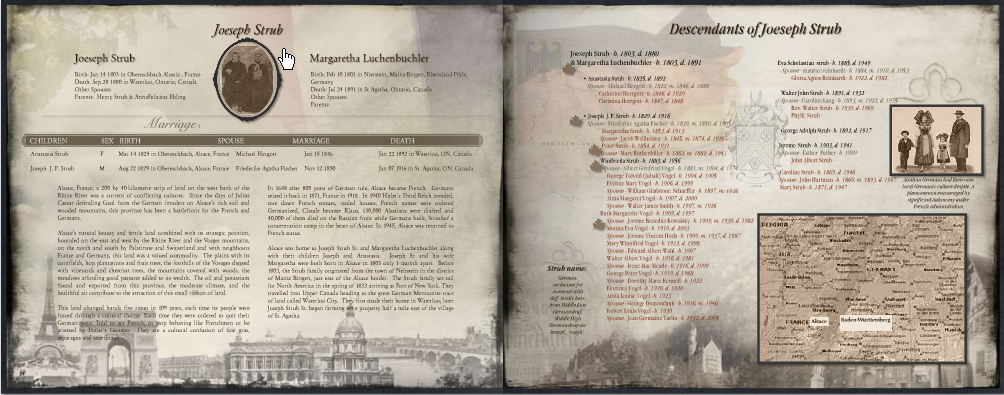
We have a brand new course starting in just a few weeks. We are excited to be delivering Creating a Legacy Family History Book. Take a look at our video, it’s just 6 minutes long and we’ll take you inside a Legacy Family History Book created with the MyCanvas software.

Your book could look like this!  Watch the video!


Here’s What You’ll Learn

Week 1 – Introductions

  • MyCanvas Tour
  • Your First Decisions

Week 2 – Getting Ready to Build and Write

  • Importing Files from Ancestry and Beyond
  • Creating a Workflow

Week 3 – Handling Pictures and Documents

  • Prepping Your Pictures and Documents
  • Copyright and Permissions

Week 4 – Structuring Your Book and Stories

  • Structuring Your Book
  • Structuring Your Stories

Week 5 – Assembling a Page

  • Basics of Assembling a Page
  • Creating a Story Framework

Week 6 – More Pages, More Writing

  • Creating a Variety of Pages
  • Bringing Your Ancestors to Life on the Page

Week 7 – Polishing Your Book

  • Revision and Editing

Week 8 – Final Product, Now What?

  • Ordering Your Book
  • Recap and Final Questions


 [button url=”https://www.familyhistorywritingstudio.com/product/creating-a-legacy-family-history-book/” class=”yellow” bg=”” hover_bg=”” size=”0px” color=”” radius=”0px” width=”0px” height=”0px” target=”_self”] I Want To Build a Legacy Family History Book [/button]


How the Class Works

Each week you will have access to one or two videos, each helping you to understand how to build a book using the MyCanvas software but also you’ll learn about structuring your book and your stories. We won’t just talk about the book we will talk about the skills you’ll need to write entertaining stories.

You can download the videos each week and watch them when they are convenient to you. If you have any questions over the course of the 8 weeks you’ll have to two teachers in the forum to help you with your project.

The homework is completely optional but we hope you’ll complete the homework so that we can help you with any questions you may have along the way.

Here are a few comments from some students who have already taken some of our classes, so you can be sure we will deliver quality and value for your money.

What Students Have Said about The Family History Writing Studio

Kim Said:

I thoroughly enjoyed completing this course in “Writing a Family History Scene” and would recommend it to all aspiring family history writers. It is inspiring when you can see yourself and your fellow students improve so much by the end of the course. Lynn’s teachings have given us the tools to carefully craft our stories for the enjoyment by our families. I have learned so much.

Denise Said:

This course opened my eyes to scene structure. My writing improved immensely once I had the right tools and guidance to build a scene properly. This is my second Family History Writing Studio course, and it will not be my last. Between Lynn’s excellent guidance and the input from the other students, it was an interactive learning experience I highly recommend to anyone who is thinking of writing a family history narrative. In order to do any job properly, you need the right tools and, in my opinion, this is the place to build your toolbox.

[button url=”https://www.familyhistorywritingstudio.com/product/creating-a-legacy-family-history-book/” class=”red” bg=”” hover_bg=”” size=”0px” color=”” radius=”0px” width=”0px” height=”0px” target=”_self”] I Want To Build a Legacy Family History Book [/button]

Now that we’ve answered all your questions click the link, add the course to the shopping cart and checkout. After checkout, you’ll receive an email welcoming you to the class. Closer to the date of the first class you’ll receive and email and some instruction for finding your way around the website and getting acquainted with the forum.

We look forward to seeing you in the classroom.[/vc_column_text][/vc_column][/vc_row]